Friday, May 17th 2024
As we've come to expect, the AI space evolves insanely fast! New AI tech papers seem to come every single day. Well one of those recent papers caught my attention for two reasons: a promise of higher-quality images and super easy integration into existing workflows. The paper was published on April 22nd 2024 by Nvidia's Toronto AI Lab titled, “Align Your Steps: Optimizing Sampling Schedules in Diffusion Models”. From here on out, when you see the acronym 'AYS', it is short for this new technique.
Think of diffusion models as architects, but they work slowly, like building a house brick by brick. This is due to their step-by-step plan, or 'blueprint'. A majority of recent diffusion tech announcements have been to improve the tools, not the blueprint. This new method, "Align Your Steps or AYS”, optimizes the blueprint, making building faster and (generally) the end result better.
Example of improved output
Benefits of AYS:
- Improved Quality: Generations with AYS tend to have more dynamic range, sharper lines, and stronger coherence to the given prompts (but may reduce resemblance when paired w/ a trained person model). However, quality tends to be consistently higher, regardless if a trained person model is used, when paired with a reference image for image-to-image.
- Cheaper: In SketchMeAi, the default number of steps is 20 when generating an image, which costs on average $0.04 (when model is warm). With AYS, the technique is inherently based on 10 steps so that means generation cost drops a penny to $0.03/image.
- Faster: At 20 denoising steps, an image takes about 18 seconds to generate. With AYS @ 10 steps, that number is cut in half to 9 seconds.
- Super Easy Integration: This technique can be easily applied to existing workflows that use Stable Diffusion XL, which SketchMeAi does. It also works with SD1.5 and few other popular models.
Limitations of AYS:
- Sampling Scheduler Specific: There are a number of sampling schedulers that one can use with diffusion models but from initial tests, the one that works the best w/ AYS (per the paper) is DPMSolverMultistepScheduler. Although we don't give you direct control on which scheduler to use on SketchMeAi, future techniques that require a different scheduler will mean AYS can't be used in combination.
- Inconsistent Resemblance: When using a trained person model, the resemblance seems less consistent than non-ays generations at 20 steps. So it's recommended to use AYS in the early stages of image discovery (where resemblance isnt as important), and then turn it off in when optimzating an image. As mentioned above, you can control for this by using image to image.
The AYS paper goes over 6 prompt examples using Stable Diffusion SDXL to show the image quality improvement. I wanted to replicate these results on SketchMeAi before pushing it live. Results impressed me! Check them out below with our newly built comparison tool:
1. “Cluttered house in the woods, anime, oil painting, high resolution, cottagecore, ghibli inspired, 4k”
2. “An old, creepy dollhouse in a dusty attic, with dolls posed in unsettling positions. Cobwebs, dim lighting, and the shadows of unseen presences create a chilling scene”
3. “Tiger in construction gear, perched on aged wooden docks, formidable, curious, tiger on the waterfront, textured, vibrant, atmospheric, sharp focus, lifelike, professional lighting, cinematic, 8K”
4. “A stunning, intricately detailed painting of a sunset in a forest valley, blending the rich, symmetrical styles of Dan Mumford and Marc Simonetti with astrophotography elements”
5. “Create a photorealistic scene of a powerful storm with swirling, dark clouds and fierce winds approaching a coastal village. Show villagers preparing for the storm, with detailed architecture reflecting a fantasy world”
6. “Cyberpunk cityscape with towering skyscrapers, neon signs, and flying cars”
Next, I needed to verify the promise of this technique on SketchMeAi using a trained person model (or LoRa) of myself. For fun's sake, I took one of my recent prompts focused on wearing a leather jacket with a comic style and then simply swapped out the colors mentioned in the prompt to create 4 different types of generation. Here are the AYS results (non-ays output is based on 10 denoising steps):
1. Black leather jacket
2. Red leather jacket
3. Neon-green leather jacket
(used image to image)
4. Orange leather jacket
(used image to image)
What makes AYS even more flexible is that it can be combined with the image-to-image technique to achieve even more controlled results.
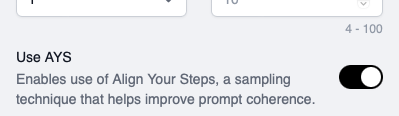
This is great and all, but how do I use AYS, you may ask? Well just below the denoising steps field, you will find the 'Use AYS' toggle. Toggling it on will disable the denoising steps field since the technique overrides the value to an equivalent of 10 steps.
If you have an account on Replicate and you want to have a quicker test of AYS without signing up for SketchMeAi, I pushed out a public SDXL model on Replicate that supports AYS. You can check that out here.
Now go see what sort of cool images you can generate with AYS!
Follow us to keep up with future posts and feature updates!